What works today
Everything Pingogram does
Everyday messaging, with notifications, voice messages and stickers, in an app that follows Material 3 Expressive from the chat list to the settings. Only what is in the app today; what comes next is at the end.
Chats
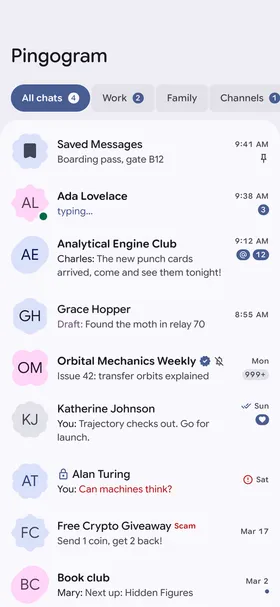
- Your Telegram folders as tabs, with unread counts.
- Each chat shows who is online, typing or verified, your draft or the last message, read ticks and unread, mention and reaction badges.
- Swipe to mark a chat as read or to archive it, with Undo.
- Select several chats and pin, mute, archive, mark as read or delete them at once from a floating toolbar.
- The archive, which works like the chat list.
- Search across your chats, contacts, public chats and channels, and messages, with filters for media and links.
- A dense list like Google's own apps: about nine chats fit on a typical phone.
Conversations
- Opens at your first unread message and loads long histories page by page.
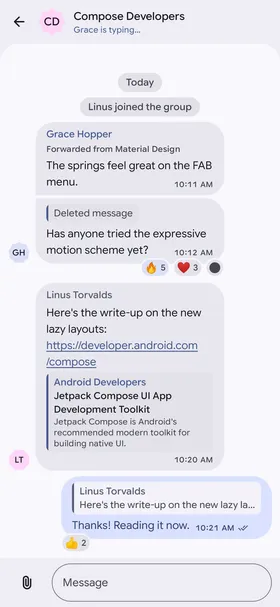
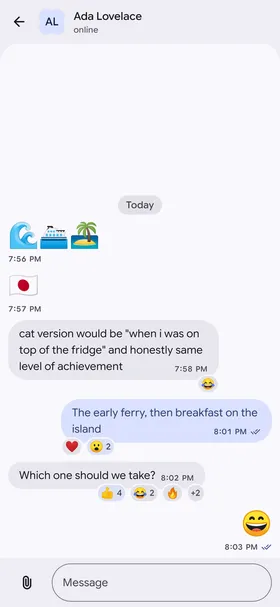
- Material 3 Expressive bubbles: rounded, grouped, and big emoji without a bubble.
- Formatted text, replies, forwards and link previews as rounded cards; tap a reply to jump to it.
- Reactions on the bubble's corner, with every reaction the chat allows.
- Write with formatting, send silently or at a time, and keep drafts in sync with your other devices.
- Reply, edit, pin, forward, select, report, save and delete for you or for everyone.
- Post as a channel you own or as an anonymous admin, where Telegram allows it.
- Messages in right-to-left languages read in their own direction.
Media
- Photos, albums, videos and GIFs, with blurred previews while they load.
- Animated stickers, and an emoji and sticker panel in the keyboard's place.
- Voice messages: hold to record, slide to cancel or lock, with a live waveform; and music playback.
- Attach photos and videos as albums, files, your location, contacts, polls and quizzes. Photos are sent without their location data.
- A full-screen viewer with zoom, swipe, share and save.
- Automatic download rules for mobile data, Wi-Fi and roaming, and Android's Data Saver respected.
- Files you send or download keep going in the background, with Cancel.
Settings
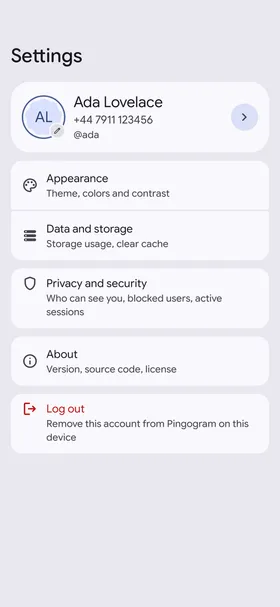
- Your profile: photo, name, username and bio.
- Privacy: who sees your phone number, last seen and photos, who can call you or add you to groups, and blocked users.
- Notifications for private chats, groups and channels, with exceptions per chat, synced with your account.
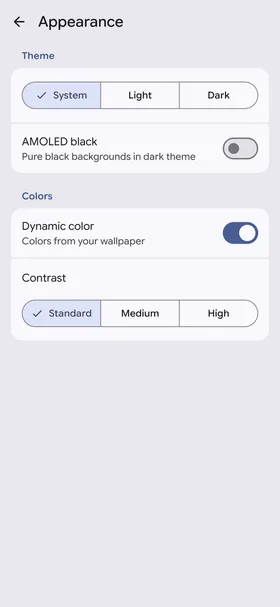
- Appearance: system, light or dark theme, AMOLED black, dynamic color and contrast.
- Data and storage: usage, clear cache and automatic download.
- The app's language apart from the phone's.
- About, with the open-source licenses of everything in the app.
Privacy and security
- No analytics, no ads, no telemetry: the app talks to Telegram, through TDLib, and to links you open.
- Builds without Google Play services or Firebase, enforced by the build.
- A passcode lock with fingerprint or face unlock, auto-lock and hidden content in recent apps.
- Two-step verification: set it, change it, turn it off or recover it.
- Active sessions: confirm new logins and end the ones you don't recognize.
- An encrypted local database with its key in the Android Keystore, and no backups.
- Location only while you share it, never in the background.
Design
- Material 3 Expressive throughout: expressive shapes, spring motion and the Expressive components.
- Google Sans Flex, using its variable axes.
- Dynamic color from your wallpaper on Android 12 and later, and the brand blue elsewhere.
- A floating navigation bar on phones; a rail and side-by-side chat list and conversation on tablets and foldables.
- Edge-to-edge, with predictive back.
- Holds up at 200% font size and with TalkBack, with keyboard focus, reduced motion and high contrast.
- A themed icon on Android 13 and later.

Coming next
In the next release:
- Builds with Google push notifications ("-gms"), next to the builds without Google services.
- Forwarding from the media viewer.
- File transfers as a Live Update on Android 16.
- Settings beside their list on tablets, and an Android 16 look for Settings.
- A slimmer composer.
After that, in this order, without dates:
- Contacts, profiles, groups and channels: your contacts, user profiles and shared media; group and channel info, members, admins and invite links; creating groups and channels; forum topics and comment threads; starting secret chats; Telegram links; and sharing into a chat from other apps.
- Calls: voice calls, with a full-screen call screen.
- Toward 1.0: stories (viewing), translations into at least five languages, search in a chat, chat export, a home-screen widget, and F-Droid.